

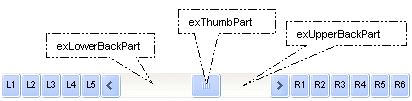
By default, the following parts are shown:
- exLeftBPart ( the left or up button of the control )
- exLowerBackPart ( the part between the left/up button and the thumb part of the control )
- exThumbPart ( the thumb/scrollbox part )
- exUpperBackPart ( the part between the the thumb and the right/down button of the control )
- exRightBPart ( the right or down button of the control )
The control fires the ClickPart event when the user clicks a part of the control. The ClickingPart event is fired continuously while the user keeps clicking the part of the control.
The following VB sample displays a message when the user clicks the exLeftB1Part part of the control:
Private Sub ScrollBar1_ClickPart(ByVal Part As EXSCROLLBARLibCtl.PartEnum)
    If (Part = exLeftB1Part) Then
        MsgBox ("Click")
    End If
End Sub
The following VB.NET sample displays a message when the user clicks the exLeftB1Part part of the control:
Private Sub AxScrollBar1_ClickPart(ByVal sender As System.Object, ByVal e As AxEXSCROLLBARLib._IScrollBarEvents_ClickPartEvent) Handles AxScrollBar1.ClickPart
    If (e.part = EXSCROLLBARLib.PartEnum.exLeftB1Part) Then
        MsgBox("Click")
    End If
End Sub
The following C++ sample displays a message when the user clicks the exLeftB1Part part of the control:
void OnClickPartScrollbar1(long Part)
{
	if ( Part == 32768 /*exLeftB1Part*/ )
		MessageBox( "Click" );
}
The following C# sample displays a message when the user clicks the exLeftB1Part part of the control:
private void axScrollBar1_ClickPart(object sender, AxEXSCROLLBARLib._IScrollBarEvents_ClickPartEvent e)
{
    if (e.part == EXSCROLLBARLib.PartEnum.exLeftB1Part)
        MessageBox.Show("Click");
}
The following VFP sample displays a message when the user clicks the exLeftB1Part part of the control:
*** ActiveX Control Event ***
LPARAMETERS part

if ( part = 32768 )
	wait window "click"
endif