

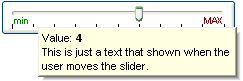
The following VB sample displays a tooltip when user moves the thumb:
Private Sub Slider1_Change()
    With Slider1
        .Object.ToolTipText = "Record " & .Value & "/" & .Maximum
        .ToolTipTitle = "Position"
    End With
End Sub
The following VB/NET sample displays a tooltip when user moves the thumb:
Private Sub AxSlider1_Change(ByVal sender As System.Object, ByVal e As System.EventArgs) Handles AxSlider1.Change
    With AxSlider1
        .ToolTipText = "Record " & .Value.ToString() & "/" & .Maximum.ToString()
		.ToolTipTitle = "Position"
    End With
End Sub
The following C# sample displays a tooltip when user moves the thumb:
private void axSlider1_Change(object sender, EventArgs e)
{
    axSlider1.ToolTipText = "Record " + axSlider1.Value.ToString() + "/" + axSlider1.Maximum.ToString();
    axSlider1.ToolTipTitle = "Position";
}
The following C++ sample displays a tooltip when user moves the thumb:
void OnChangeSlider1()
{
	CString strFormat;
	strFormat.Format( _T("Record %i/%i"), m_slider.GetValue(), m_slider.GetMaximum() );
	m_slider.SetToolTipText( strFormat );
	m_slider.SetToolTipTitle( "Position" );
}
The following VFP sample displays a tooltip when user moves the thumb:
*** ActiveX Control Event ***

with thisform.Slider1
    .Object.ToolTipText = "Record " + ltrim(str(.Value)) + "/" + ltrim(str(.Maximum))
    .ToolTipTitle = "Position"
endwith