

The following screen shot shows how toolbar shows up:

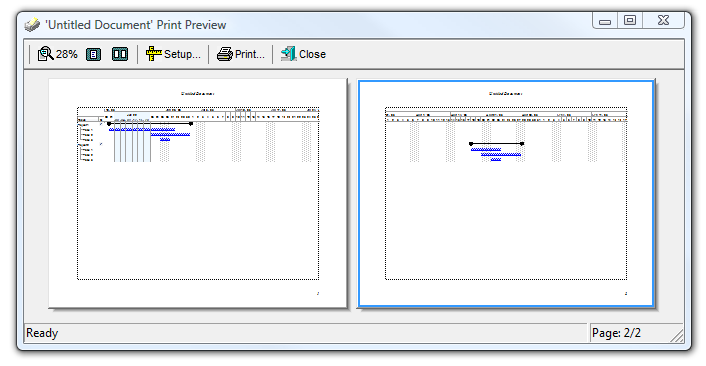
so, by default, the toolbar displays the Magnify ( 100 ), One Page ( 101 ), Two Page (102 ), Setup (103), Print (104) and Close (105) buttons. Use the ToolBarFormat property to add new buttons, to display icons, pictures, or any other HTML caption. The ItemCaption property specifies the caption of the button. The ItemToolTip property specifies the button's tooltip. The control fires the Click event when the user clicks a button in the eXPrint's toolbar. The control fires the AnchorClick event when the user clicks an hyperlink element.
The following VB sample adds three buttons to the right side of the toolbar to display and edit the paper size, the paper orientation, and to display the current printer ( as shown in the following screen shot ):
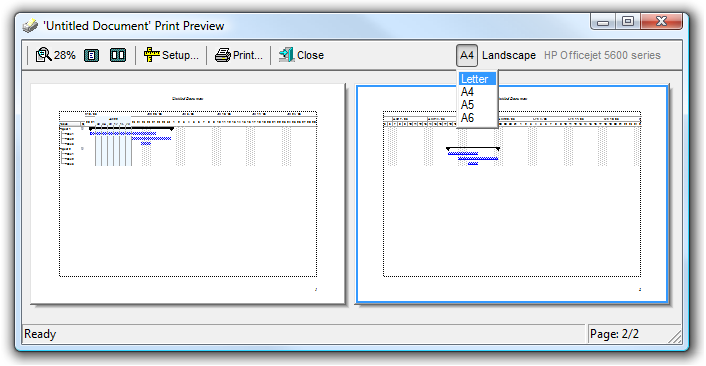
With Print1
    .ToolBarFormat = .ToolBarFormat & ",|,(201,200,-201):224"
End With
Private Sub Print1_Click(ID As Long, SelectedID As Long)
With Print1
If (ID = 200) Then
.PageOrientation = SelectedID
.Refresh
End If
If (ID = 201) Then
.Settings(exPaperSize) = SelectedID
.Refresh
End If
End With
End Sub
Private Sub Print1_Refresh()
With Print1
.ItemCaption(-201) = "<fgcolor=808080>" & .Settings(exPrinterName) & "</fgcolor>"
.ItemToolTip(-201) = .Settings(exPrinterName)
.ItemCaption(200) = IIf(.PageOrientation = exLandscape, "Landscape#1", "Portrait#2")
.ItemToolTip(200) = "Page Orientation"
.ItemCaption(201) = .Settings(exFormName) & vbCrLf & "Letter#1" & vbCrLf & "A4#9" & vbCrLf & "A5#11" & vbCrLf & "A6#70"
.ItemToolTip(201) = "Paper Size"
End With
End SubThe following VB/NET sample adds three buttons to the right side of the toolbar to display and edit the paper size, the paper orientation, and to display the current printer ( as shown in the following screen shot ):
With Exprint1
    .ToolBarFormat = .ToolBarFormat & ",|,(201,200,-201):224"
End With
Private Sub Exprint1_Click(ByVal sender As System.Object, ByVal ID As System.Int32, ByVal SelectedID As System.Int32) Handles Exprint1.Click
With Exprint1
If (ID = 200) Then
.PageOrientation = SelectedID
.Refresh()
End If
If (ID = 201) Then
.set_Settings(exontrol.EXPRINTLib.FieldsEnum.exPaperSize, SelectedID)
.Refresh()
End If
End With
End Sub
Private Sub Exprint1_RefreshEvent(ByVal sender As System.Object) Handles Exprint1.RefreshEvent
With Exprint1
.set_ItemCaption(-201, "<fgcolor=808080>" & .get_Settings(exontrol.EXPRINTLib.FieldsEnum.exPrinterName) & "</fgcolor>")
.set_ItemToolTip(-201, .get_Settings(exontrol.EXPRINTLib.FieldsEnum.exPrinterName))
.set_ItemCaption(200, IIf(.PageOrientation = exontrol.EXPRINTLib.PageOrientationEnum.exLandscape, "Landscape#1", "Portrait#2"))
.set_ItemToolTip(200, "Page Orientation")
.set_ItemCaption(201, .get_Settings(exontrol.EXPRINTLib.FieldsEnum.exFormName) & vbCrLf & "Letter#1" & vbCrLf & "A4#9" & vbCrLf & "A5#11" & vbCrLf & "A6#70")
.set_ItemToolTip(201, "Paper Size")
End With
End Sub