The
FormatAppearance objects can be accessed through the control's FormatAppearances
property. The FormatAppearance object changes the visual appearance of your data as
listed:
- font attributes, like bold, italic,...
- different foreground colors
- different background colors, including the ability to show EBN objects
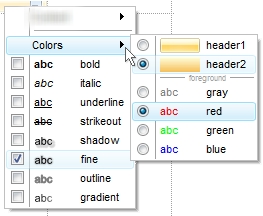
The following screen shot shows the control's context menu with the
FormatAppearance objects:
The FormatAppearance object supports the following properties
and methods:
| | Name | Description | |
| | BackColor | Specifies the element's background color. | |
| | Bold | Renders as bold text. | |
| | Font | Retrieves or sets the text's font. | |
| | FontSize | Indicates the size of the font to display the text. | |
| | ForeColor | Specifies the element's foreground color. | |
| | Gradient | Renders the text with a gradient color. | |
| | GradientMode | Indicates the gradient mode to be applied on text. | |
| | Italic | Renders as italic text. | |
| | Key | Indicates the key of the FormatAppearance object. | |
| | Name | Specifies the name of the FormatAppearance object to be displayed on the context menu. | |
| | Outline | Renders the text outlined with specified color. | |
| | OutlineSize | Indicates the size of the outline to be applied on text. | |
| | Shadow | Renders the text with a shadow of specified color. | |
| | ShadowOffset | Indicates the offset of the shadow to be applied on text. | |
| | ShadowSize | Indicates the size of the shadow to be applied on text. | |
| | StrikeOut | Specifies that the text should appear as strikeout. | |
| | ToolTip | Specifies the tooltip of the FormatAppearance object to be displayed when the cursor hovers the object. | |
| | Underline | Underlines the text. | |

