

Checks or uncheck the item. The control displays a check box left to the item's caption. Use the Caption property to specify the caption of the item. If the Check property is True, the control displays a check box, if the Bullet property is False, else the control displays a bullet, if the Bullet property is True. The control fires the Select event when the user selects an item. Use the Image property to assign an icon to an item. Use the CheckEffect property to change the visual effect of the check box or bullet inside the item.
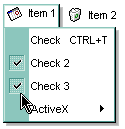
The following VB sample checks or uncheck the items (30,40,50) when the user selects any of them:
Private Sub ExMenu1_Select(ByVal ID As Long)
    Dim bChange As Boolean
    bChange = False
    Select Case ID
        Case 30
            bChange = True
        Case 40
            bChange = True
        Case 50
            bChange = True
    End Select
    If (bChange) Then
        ExMenu1.Item(ID).Check = Not ExMenu1.Item(ID).Check
    End If
End Sub
The following C++ sample checks or uncheck the items (30,40,50) when the user selects any of them:
void OnSelectExmenu1(long ID)
{
	switch ( ID )
	{
		case 30:
		case 40:
		case 50:
		{
			CItem item = m_menu.GetItem( COleVariant( ID ) );
			item.SetCheck( !item.GetCheck() );
			break;
		}
	}
}
The following VB.NET sample checks or uncheck the items (30,40,50) when the user selects any of them:
Private Sub AxExMenu1_SelectEvent(ByVal sender As System.Object, ByVal e As AxEXMENULib._IMenuEvents_SelectEvent) Handles AxExMenu1.SelectEvent
    Dim bChange As Boolean = False
    Select Case e.iD
        Case 30
            bChange = True
        Case 40
            bChange = True
        Case 50
            bChange = True
    End Select
    If (bChange) Then
        AxExMenu1.item(e.iD).Check = Not AxExMenu1.item(e.iD).Check
    End If
End Sub
The following C# sample checks or uncheck the items (30,40,50) when the user selects any of them:
private void axExMenu1_SelectEvent(object sender, AxEXMENULib._IMenuEvents_SelectEvent e)
{
	switch (e.iD)
	{
		case 30:
		case 40:
		case 50:
			{
				EXMENULib.item item = axExMenu1[e.iD];
				item.Check = !item.Check;
				break;
			}
	}
}
The following VFP sample checks or uncheck the items (30,40,50) when the user selects any of them:
*** ActiveX Control Event ***
LPARAMETERS id

local bChange
bChange = .f.
do case
	case id = 30
		bChange = .t.
	case id = 40
		bChange = .t.
	case id = 50
		bChange = .t.
endcase
if ( bChange )
	with thisform.ExMenu1.Item(id)
		.Check = !.Check()
	endwith
endif