

Use the Alignment property to align the item's caption. By default, the item's caption is aligned to the left side of the item. Use the Caption property to specify the item's caption. Use the <r> built-in HTML tag to align parts of text to the right.
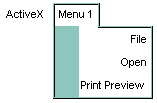
The following VB sample adds some items that are aligned to the right:
With ExMenu1
        .Border = BumpBorder
        With .Items
            With .Add("Menu 1", EXMENULibCtl.SubMenu).SubMenu
                .Add("File").Alignment = exRight
                .Add("Open").Alignment = exRight
                .Add ("Print Preview")
            End With
        End With
        .Refresh
End With
The following C++ sample adds some items that are aligned to the right:
COleVariant vtMissing; V_VT( &vtMissing ) = VT_ERROR;
m_menu.SetBorder( 5/*BumpBorder*/ );
CItem item = m_menu.GetItems().Add( "Menu 1", COleVariant( (long)2 /*SubMenu*/ ), vtMissing );
CItem itemF = item.GetSubMenu().Add( "File", vtMissing, vtMissing );
itemF.SetAlignment( 2 /*RightAlignment*/ );
CItem itemO = item.GetSubMenu().Add( "Open", vtMissing, vtMissing );
itemO.SetAlignment( 2 /*RightAlignment*/ );
item.GetSubMenu().Add("Print Preview", vtMissing, vtMissing);
m_menu.Refresh();
The following VB.NET sample adds some items that are aligned to the right:
With AxExMenu1
    .Border = EXMENULib.BorderEnum.BumpBorder
    With .Items
        With .Add("Menu 1", EXMENULib.ItemTypeEnum.SubMenu).SubMenu
            .Add("File").Alignment = EXMENULib.AlignmentEnum.exRight
            .Add("Open").Alignment = EXMENULib.AlignmentEnum.exRight
            .Add("Print Preview")
        End With
    End With
    .CtlRefresh()
End With
The following C# sample adds some items that are aligned to the right:
axExMenu1.Border = EXMENULib.BorderEnum.BumpBorder;
EXMENULib.Menu items = axExMenu1.Items;
EXMENULib.Menu subMenu = items.Add("Menu 1", EXMENULib.ItemTypeEnum.SubMenu, null).SubMenu;
subMenu.Add("File", null, null).Alignment = EXMENULib.AlignmentEnum.exRight;
subMenu.Add("Open", null, null).Alignment = EXMENULib.AlignmentEnum.exRight;
subMenu.Add("Print Preview", null, null);
axExMenu1.CtlRefresh();
The following VFP sample adds some items that are aligned to the right:
With thisform.ExMenu1
        .Border = 5 && BumpBorder
        With .Items
            With .Add("Menu 1", 2).SubMenu && EXMENULibCtl.SubMenu
                .Add("File").Alignment = 2 && exRight
                .Add("Open").Alignment = 2 && exRight
                .Add ("Print Preview")
            EndWith
        EndWith
EndWith
thisform.ExMenu1.Object.Refresh